
It is possible to configure a default unit, amongst other codes, that will get selected by default when a user loads one of the main data entry forms and selects a particular profession. This is done per user using the User Preferences page.
- Go to the User Preferences page.
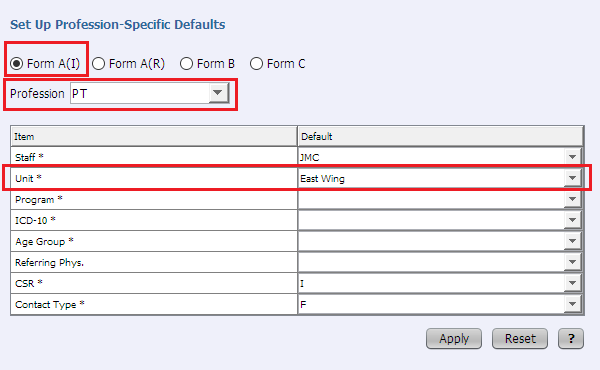
- In the ‘Set Up Profession-Specific Defaults’ section at the bottom of the page:
- Select the data entry form you wish to set the default unit for using the radio buttons.
- Select the desired profession in the profession dropdown.
- In the Unit row, select the desired unit code in the Default dropdown.
- Click the Apply button to save the change.
💡 NOTE
User preferences are set by a user for their own account. They cannot be set by one user for a different user.