
It is possible to enable the creation of an audit record any time a user views a record that contains personal health information. This can be used to comply with provincial health data privacy rules.
Enabling this is done by configuring a property in the INFOMED.properties file on the server:
- Navigate to the <Promiso installation folder>/jsp/lib/ folder.
- Locate the INFOMED.properties file and open it in a text editor such as notepad.
- Ensure that the following property is present and set to true:
AuditPersonalHealthInfoReads=true - Save the changes ensuring that the file is saved as INFOMED.properties and not INFOMED.properties.txt.
- Restart Apache Tomcat in order for the changes to take effect.
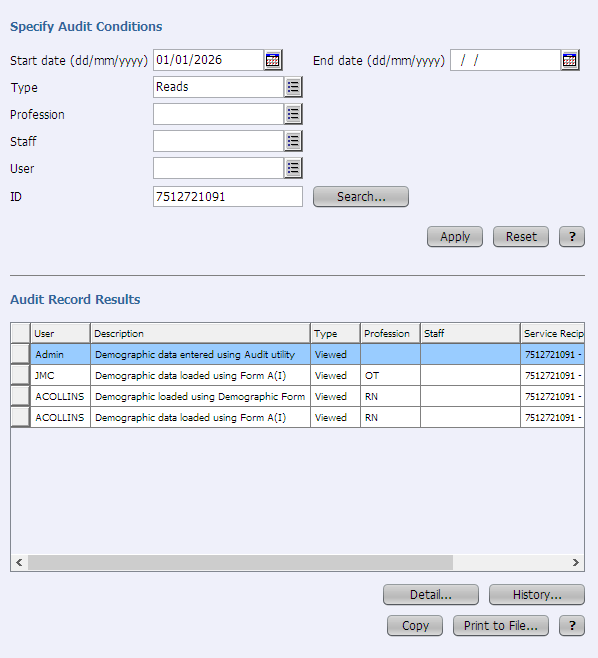
The Utilities > Audit > Viewer page will then include a “Reads” option in the Type field and can be used to see who has viewed records with personal health information for a particular patient.
Example
The following screenshot shows an example of an audit search for audit records related to any times that a patient with the ID 7512721091 was viewed by users in 2026:
💡 NOTE
The auditing of reads can lead to a lot of additional audit records and an increased database size for large sites. The audit purge functionality on the Utilities > Audit > Configuration page can be used to automatically remove audit records older than a configured number of days.