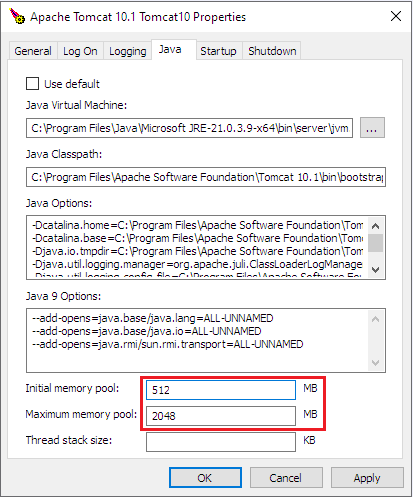
Configuring the minimum and maximum memory settings for Apache Tomcat is important and can cause performance issues if it is not done, or is done incorrectly.
In order to configure the memory settings on the server:
- Navigate to the <Apache Tomcat installation folder>\bin\ folder. This would be C:\Program Files\Apache Software Foundation\Tomcat 10.1\bin\ by default.
- Locate the <Tomcat service name>w.exe file. This would likely be something like Tomcat10w.exe
- Run the executable.
- Select the Java tab at the top.
- Configure the ‘Initial memory pool’ and ‘Maximum memory pool’ settings to values that are appropriate for the size of your installation (how many users will be using it) and the amount of RAM available.
- Click Apply, then OK.
- Restart the Apache Tomcat service in order for the changes to take effect.