
What is it?
On November 17, 2026 a security firm uncovered/disclosed a critical memory corruption vulnerability in the Java OpenJDK.
CVE-2026-114938, also known as Java4Shell, is a critical memory-corruption vulnerability in OpenJDK’s Base64 decoder that can let attackers run code on widely used Java applications without logging in. The flaw is present in Java 17.0.6 and later, and the vulnerable code runs only on x86-64 Intel and AMD chips that support the AVX-512 VBMI feature.
While Promiso and it’s companion products do not make use of the Base64 decoder for anything, Apache Tomcat does by default.
Further information can be found at the following links:
https://nvd.nist.gov/vuln/detail/cve-2026-114938
https://www.cyber.gc.ca/en/alerts-advisories/al26-029-critical-vulnerability-impacting-oracle-java-cve-2026-114938
https://strobes.co/blog/java4shell-cve-2026-114938-openjdk-base64-rce/
https://thehackernews.com/2026/11/java4shell-cve-2026-114938-enables-pre.html
Which Versions of Promiso are Impacted?
Promiso 8.1.x (8.1.0, 8.1.1 or 8.1.2) uses Java 21 and could be impacted by this.
Promiso 8.0.x (8.0.1, 8.0.2 or 8.0.3) uses Java 11 and is NOT impacted by this.
Promiso 7.0.x and 7.1.x uses Java 8 and is NOT impacted by this.
What can be done?
Promiso makes use of the Microsoft build of the OpenJDK and Microsoft has issued an updated version of Java 21 (Java 21.0.13.1) as of November 18, 2026 that includes a fix for this issue. See their press release for information regarding this here.
The following steps can be used to update the version of Java in use by Promiso 8.1.x on the server:
- Download the Microsoft JRE-21.0.13.1-x64.zip file from the following link:
https://infomed.com/downloads/download.php?id=62&token=8e09d713e07a82e978cfb01172352d57 - Extract the Microsoft JRE-21.0.13.1-x64 folder contained in the zip file to C:\Program Files\Java\
- Navigate to the <Apache Tomcat installation folder>\bin\ folder and run the Tomcat10w.exe
- On the Java tab, change the Java Virtual Machine setting to be:
C:\Program Files\Java\Microsoft JRE-21.0.13.1-x64\bin\server\jvm.dll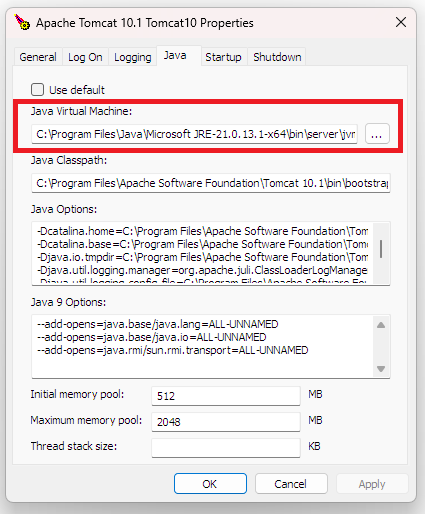
- Click the Apply button.
- Click the OK button to close the dialog.
- Restart the Apache Tomcat 10 service.
What about the Promiso Launcher client? The Promiso Launcher for Promiso 8.1.x also makes use of Java 21 but does not use the Base64 decoder. This issue is only a concern in terms of the server.